


How to Upload Radio Audio to Your News Site
Our AM news radio stations and news websites are powerful partners—both delivering timely, valuable information to our communities. When used together, they significantly expand your reach and allow your content to connect with a broader audience.
Uploading radio audio to your news site is an effective way to extend the life of your content—but it must be done strategically. Our news sites rely heavily on search, so properly formatting your audio posts ensures they are discoverable, listened to, and shared.
1. Keep Audio Short and Consumable
Just like a podcast, length matters.
If a listener can’t finish the audio during a typical drive, they are far less likely to start it. Instead of uploading full shows, break content into smaller segments.
Best Practice:
- Divide shows by interview or topic, not by full program blocks
- Keep segments focused and easy to consume
2. Write Strong, Search-Friendly Headlines
The headline is one of the most important elements for both search and engagement. It should clearly communicate what the listener will gain.
Avoid:
- Including dates (the system already handles this)
- Generic phrasing that doesn’t tell a story
Bad Examples:
- John Doe Interviews Jane Doe
- Morning Show Segment with Mayor Smith
- 3/15 Interview with Police Chief
Better Examples:
- Jane Doe Explains What New School Policies Mean for Parents | PODCAST
- Mayor Smith Addresses Rising Growth and What’s Next for the City | PODCAST
- Police Chief Discusses Recent Crime Trends and Community Safety | PODCAST
Think of your headline as a tease—give people a reason to click and listen.
It is good practice to add “PODCAST” in the headline to clearly tell the reader that it is audio. Additionally, the name of your Podcast is short enough, you can add it also.
3. Use the Excerpt to Boost Search
The excerpt becomes your meta description in search engines. It tells both readers and Google what the content is about.
Best Practice:
- Write 1–2 sentences that clearly summarize the interview or topic
- Include key terms people might search for
- Make it compelling enough to encourage clicks
4. Use Strong, Relevant Images
Images are critical for stopping the scroll and driving engagement.
Do NOT use:
- Show logos as your main image
Why:
- Logos often get cropped incorrectly across devices
- They resemble ads and are frequently ignored
- Repeating the same image across posts reduces engagement
Instead:
- Use real, engaging images that match the content
- Take photos in the studio when possible
- If interviews are remote, build a library of quality studio shots or use relevant stock images
Always include:
- Proper image sourcing/credit
- A clear, descriptive caption
Here is a good example of a good use of multiple images:
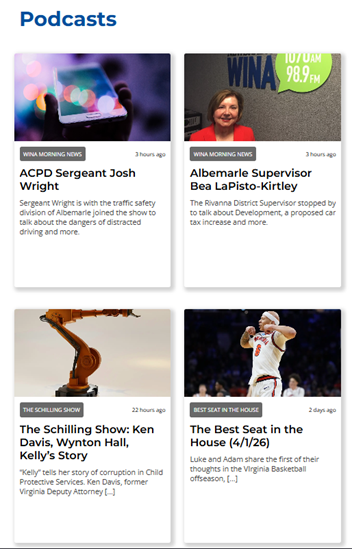
***Also notice the good use of primary section labels. When you choose your Podcast as the “Primary Section,” it is presented in the publication.
5. Write an Opening Paragraph
Every audio post should include a short introductory paragraph.
This is important for:
- Readers – helping them understand what they’re about to hear
- Search engines – giving context for indexing
Best Practice:
- 2–3 sentences summarizing the key topic and why it matters
- Naturally include keywords relevant to the discussion
Simply uploading the audio without an opening paragraph gives search engines nothing to search. They cannot search your audio embed.
Extras to Strengthen Your Page
- Create a branded banner ad (970×250) at the top of the page
- This replaces the need to use logos in your images
- Reinforces your show’s identity in a more effective way
- Add a show description under the page title
- Clearly explain what your show is about
- Assume the audience does not know your program
Radio is built on strong teases and storytelling—this is no different.
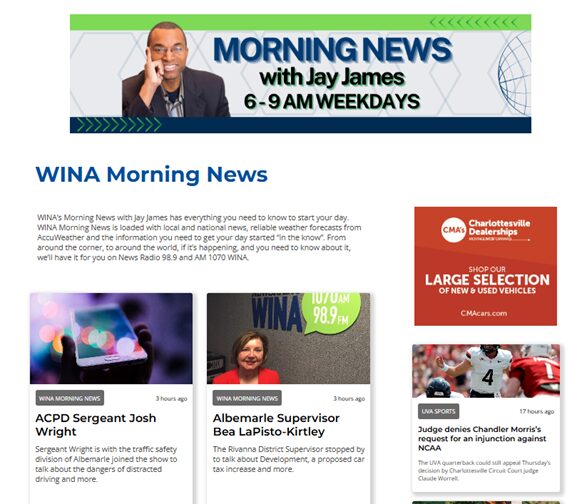
Don’t forget to promote your audio on air. Let your listeners know that if they missed the show, they can find it online. Make the promo specific to the actual show, not just a generic, “find me online” promo. Give them a reason to search for you.